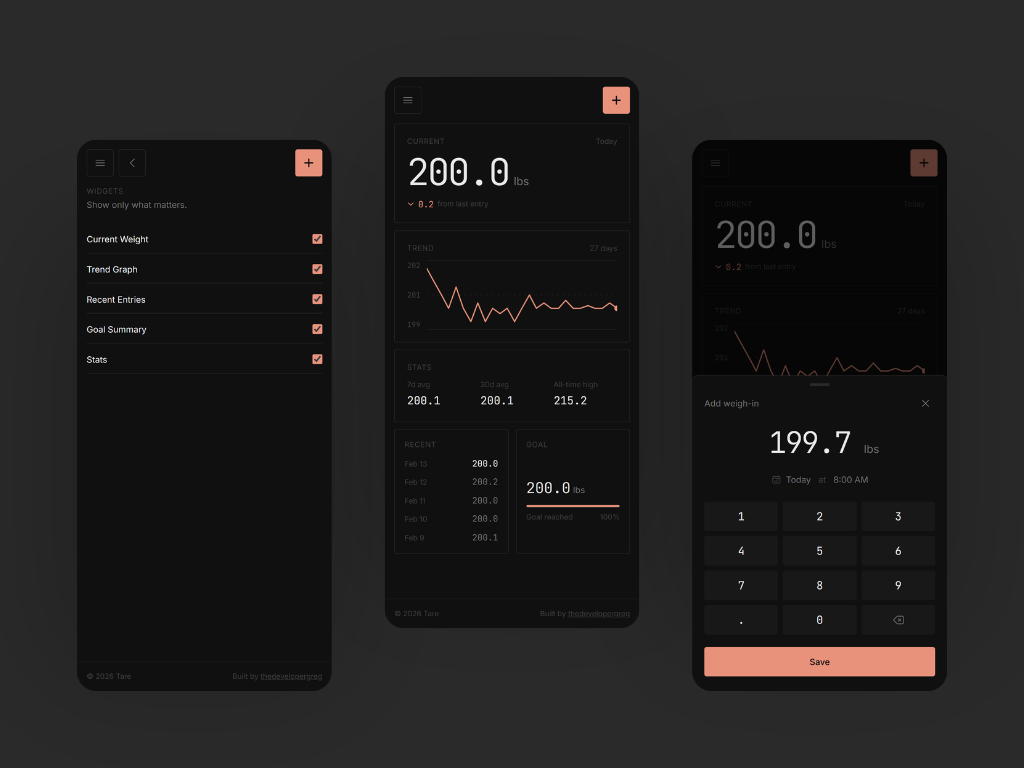
I wanted a weight tracker that felt like a personal notebook, not a social feed. Something that worked offline by default, didn't try to coach me, and let me own my data without making it a premium feature.
The name comes from zeroing a scale before weighing. You measure against yourself, not the world.
Architecture
The app works completely offline with no account required. All data lives in IndexedDB via Dexie. I wanted local-first to be the default experience, not a fallback. If you sign in (email OTP through Clerk), entries sync to Cloudflare D1 as a replica. The local store is always the authority. You can delete all data from both devices at once or go back to local-only whenever you want.
Sync is push-then-pull on sign-in, then fire-and-forget pushes after mutations. Soft deletes propagate across devices. I kept conflict resolution simple: last write wins by creation timestamp. Complex merge strategies felt like over-engineering for a single-user weight tracker.
Features and design philosophy
The home screen is a blank canvas of toggleable widgets. Just widgets: no tabs, nav chrome, or branding. You see what you want: current weight with configurable delta (last entry, yesterday, or 1-week comparison), a 30-day trend graph, recent entries, goal progress, and stats (7-day average, 30-day average, plus an all-time stat that adapts based on goal direction). Widget positions are fixed in a CSS grid. I considered drag-and-drop but decided against it for MVP. Show/hide via checkboxes in settings felt more predictable and removed a layer of decision fatigue.
You can set one weight goal. Just a target weight - nothing about deadlines, pace tracking, or "you're on track!" messaging. The goal widget shows your target, a minimal progress bar, and distance remaining. The stats widget adjusts its third metric based on goal direction: if you're losing weight, it shows all-time low; if you're gaining, it shows all-time high. If there's no goal set, the third stat doesn't appear at all.
I didn't want to pull in a charting library for one simple line graph. The trend chart is hand-rolled SVG: a 30-day window with sparse axis labels, a 2px accent stroke, and a filled dot for the current value. It's static - just the line and the data. Same philosophy for the numpad in the weigh-in sheet. I wanted one-handed entry without relying on the OS keyboard, so I rendered my own. Large touch targets, monospaced numbers, and a backspace icon. It slides up from the bottom, you type your weight, optionally backdate the entry, and save.
The accent color appears in exactly five places: the add button, the save button, the trend line, the delta indicator, and the goal progress bar. Nowhere else. The palette is minimal - seven tokens in dark mode. Typography does the work: JetBrains Mono for all weight numbers and stats, Inter for UI text. Widget headers are uppercase, tracked-wider, and muted. Font weights stay at 500 or below. I avoided gradients, shadows, border radius larger than 6px, and glow effects. The goal here is calm restraint.
Tare can handle import and export of data easily with Excel or JSON files. The app converts everything to kilograms internally and displays in your preferred unit.
Stack
- React SPA with TanStack Router and Query (no server rendering)
- Clerk for auth (email OTP, no passwords)
- Backend: Hono on Cloudflare Workers with D1 and Drizzle ORM
- Client-generated ULIDs for sortable IDs
- TailwindCSS
- Biome for linting and formatting
- Vitest for tests covering all business logic (weight conversions, stats calculations, date utilities, sync logic)
Post-MVP
- Light mode (warm parchment palette with a different accent)
- Entry correction UI with a "corrects" relationship field
- Toast with undo after saving
- PWA / installable support
- Trend graph timeframe selector (7d / 30d / 90d / all)
- Logging frequency goals with streak tracking
It does what I needed - a calm place to track weight without the noise. The MVP is feature-complete for daily use, built first and foremost as a tool I'd actually want to open.